
TL;DR

Get business pricing on garage and car supplies
- Business-only prices and quantity discounts
- Tax-exempt purchasing
- Multiple users, one account, clear invoices
Building your own AI workstation used to be cheaper, but recent component shortages and price spikes favor prebuilt systems. The best choice depends on your control needs, budget, and speed to deployment.
Imagine firing up your AI project and having everything ready to run—in minutes. No fuss, no compatibility worries. That’s the promise of a prebuilt AI workstation. But is it always the smarter choice? Or does building your own give you more control, even now? In 2026, the landscape has shifted dramatically. Price spikes, supply chain snarls, and AI-specific optimizations make this decision more nuanced than ever.
Whether you’re a solo researcher, a startup, or a big lab, understanding the true tradeoffs can save you time, money, and headaches. This isn’t just about cost—it’s about speed, reliability, upgrade paths, and knowing exactly what you get. Let’s break down what matters now and how to pick the right path for your AI ambitions.
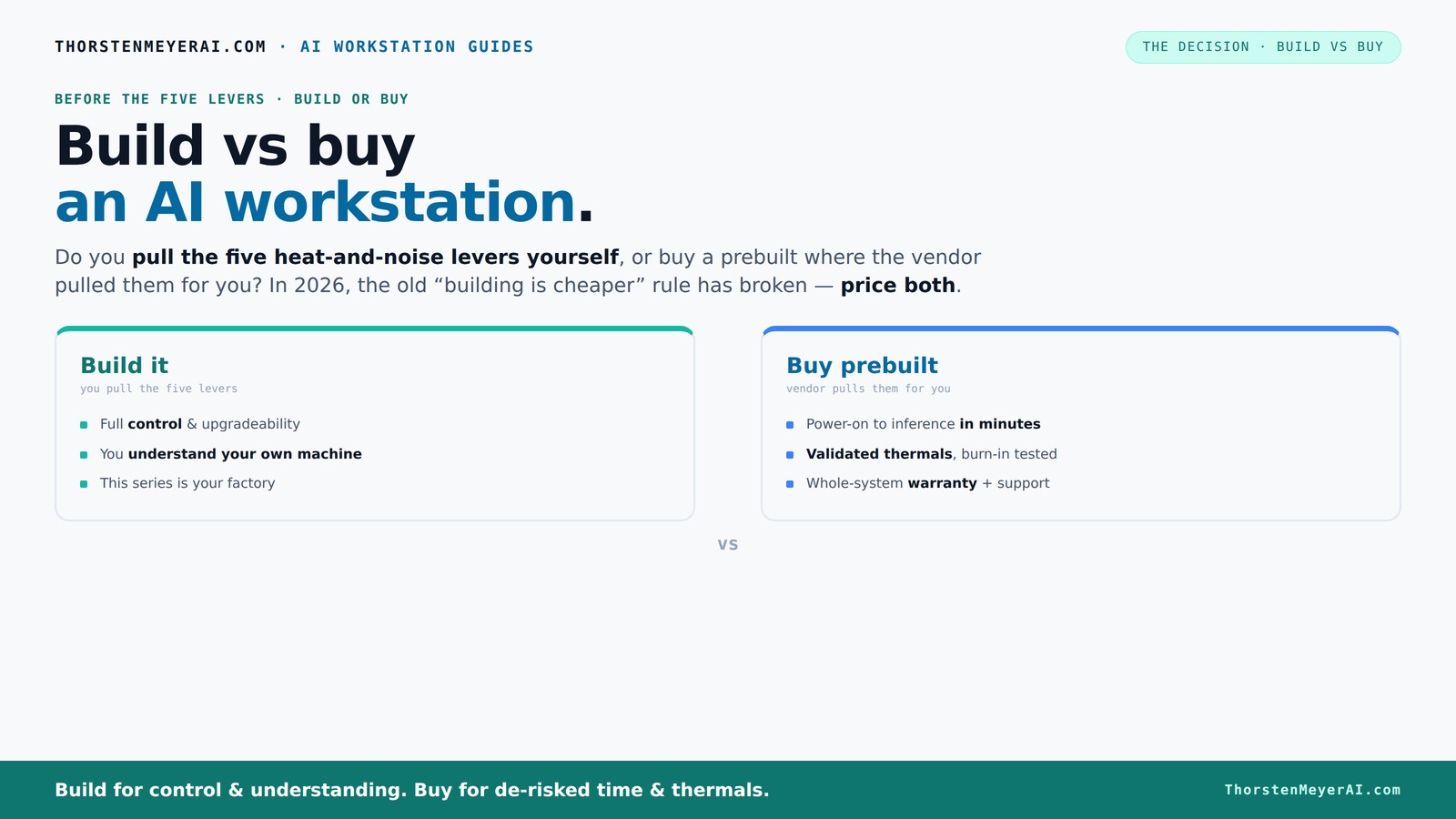
Build vs buy
an AI workstation.
The real question behind this whole series: do you pull the five heat-and-noise levers yourself, or buy a prebuilt where the vendor pulled them for you? And in 2026, the old “building is cheaper” rule has broken. Match your situation in Part 3.
Key Takeaways
- In 2026, component shortages and bulk buying mean prebuilt AI workstations often match or beat DIY costs, flipping the traditional advantage.
- Prebuilts offer validated thermals, support, and quick setup—ideal for those who want to deploy fast and avoid troubleshooting.
- Building your own gives maximum control over parts, cooling, and upgrade paths, but requires time, skill, and patience.
- Always compare specific prices for your configuration today—don’t assume DIY is cheaper just because you assemble it yourself.
- Choose a prebuilt if you need reliability, warranty, and minimal hassle; build if you want customization and potential savings.
As an affiliate, we earn on qualifying purchases.
Why 2026 Changes Everything About Building or Buying
In 2026, building your AI workstation is no longer automatically cheaper. Component shortages and price hikes for GPUs, DDR5 RAM, and SSDs have pushed DIY costs higher. A build that once cost less than a thousand now easily hits $1,250 or more, even before adding the OS.
Meanwhile, prebuilt manufacturers bought those parts in bulk before prices soared. They can now offer systems at prices that are tough to beat—sometimes even cheaper than sourcing parts yourself. So, the old rule that building is always cheaper no longer holds. You need to compare prices for your exact setup today.
This shift turns the traditional debate into a complex decision involving cost, time, thermal tuning, warranty, and future flexibility. You can build vs buy a prebuilt AI workstation to explore your options. It’s not just about saving a buck anymore. It’s about what makes sense for your workload and timeline.
As an affiliate, we earn on qualifying purchases.
The Five Levers of a High-Power AI Workstation—and Who Controls Them
Every high-end AI machine runs hot and loud. Making it quiet and cool involves five key levers: undervolting the GPU, choosing the right cooler, optimizing airflow, tuning fan curves, and placing the system well. For more on optimizing your setup, see build vs buy a prebuilt AI workstation.
When you buy a prebuilt, the vendor pulls these levers—testing, tuning, and validating the thermal setup before it reaches you. Many vendors use water-cooling or custom fans to lower noise and temperatures, often with a warranty backing their work. This process ensures that the system is optimized for performance and longevity without requiring you to tinker yourself, which can be critical when time is limited or expertise is lacking.
If you build your own, you get to set these levers yourself. You choose a quiet GPU, undervolt it, pick a cooler, and tweak the airflow. It’s your factory, but it takes time and know-how. Hobbyists often spend evenings testing different fan curves, thermal pads, and airflow configurations—these adjustments directly impact system stability, noise levels, and thermal headroom. The decision here hinges on whether you value convenience and tested performance or control and customization that might come with trial, error, and learning.
As an affiliate, we earn on qualifying purchases.
Prebuilt vs DIY: Which Saves You Time and Hassle?
If speed is your priority, prebuilt systems are hard to beat. They arrive ready to run, with the OS, drivers, and AI stacks preinstalled. Learn more about prebuilt options at mostwantedspeed.com. You just power on and start training or inference. For busy professionals, that can mean days or weeks shaved off setup time. This is crucial when rapid deployment can be the difference between seizing an opportunity or missing it, especially in competitive research or commercial applications.
On the other hand, building your own takes time—sourcing parts, assembling, troubleshooting BIOS issues, and tuning. But it offers a tailored setup. For example, if you need a specific PCIe layout or extra NVMe slots, DIY lets you customize exactly that, which might be necessary for particular workloads or future expansion plans. The tradeoff is that DIY involves a learning curve, potential troubleshooting, and longer lead times, which might not be feasible under tight project deadlines.
Here’s a quick comparison:
| Prebuilt | DIY |
|---|---|
| Fast deployment—plug and play | Time-consuming assembly and setup |
| Pre-validated thermals and support | Requires testing and tuning |
| Limited customization options | Full control over parts and layout |
| Warranty and support included | Support depends on individual parts |
As an affiliate, we earn on qualifying purchases.
Cost Comparison: Building Your Own Might Not Be Cheaper Anymore
Building your own system used to save you money. But in 2026, the prices for high-end parts have surged. For guidance on building or buying, visit heritagecycleworks.com. DDR5 RAM alone can cost 30% more than last year. GPUs, especially the latest models, are often sold out or marked up by scalpers, making it harder to find affordable options.
Check this example: a custom build with a top-tier GPU, 128GB RAM, and a fast SSD now costs around $2,000. Compare with prebuilt options at build vs buy a prebuilt AI workstation. A prebuilt with similar specs can often be found for $2,100, thanks to bulk discounts and vendor optimization. This parity or even slight edge for prebuilts is driven by their ability to buy in bulk and optimize component selection, which often results in lower overall prices than DIY sourcing, especially when factoring in the time and effort spent on assembly and troubleshooting.
So, don’t assume DIY is cheaper. Always compare specific prices for your configuration. Sometimes, the vendor’s bulk buying gives them an edge that outweighs your savings from sourcing parts yourself. This shift emphasizes that the economic advantage of DIY is diminishing, and strategic buying might be the smarter choice for many.
What to Look for in a Prebuilt AI Workstation — The Checklist
If you’re considering a prebuilt, here’s what to scrutinize:
- Component quality—are they using high-quality, enterprise-grade parts? High-quality components ensure longevity, better thermal performance, and reliability under sustained loads, which is vital for AI workloads that run continuously.
- Thermal validation—has the vendor tested for sustained workloads? Proper thermal validation means the system can handle prolonged AI tasks without thermal throttling, which directly impacts performance. For more insights, see build vs buy a prebuilt AI workstation. consistency.
- Cooling solutions—water cooling or custom fans for quiet operation? Effective cooling solutions not only keep the system quiet but also extend component lifespan and maintain peak performance during intensive tasks.
- Upgrade options—can you add more RAM or swap GPUs later? Future-proofing is crucial; systems with accessible slots and standardized connectors allow for scalable upgrades, protecting your investment as your project grows.
- Support & warranty—what’s covered, and for how long? Reliable support minimizes downtime, especially during critical phases, and comprehensive warranties provide peace of mind for costly repairs or replacements.
- Proprietary parts—any connectors or motherboards that limit repairability? Proprietary components can complicate repairs or upgrades, potentially increasing costs and downtime when issues arise.
- AI-specific features—optimized drivers, ISV certifications, or accelerators? These features ensure compatibility with AI software, stability during heavy workloads, and optimal performance, which are essential for professional AI work. For example, Lambda offers systems tested for multi-GPU workloads with up to 5-year support, making them ideal for mission-critical AI projects. Choosing a system with these considerations in mind can significantly impact your project's success and operational costs.
Upgradeability and Repairs: Can Your System Grow or Fix Itself?
Upgrading an AI workstation isn’t just about swapping out a GPU. It’s about how easily you can add RAM, change cooling, or replace a power supply without major overhaul costs or downtime. A system with accessible slots, standardized connectors, and a modular design makes future upgrades straightforward and cost-effective, allowing your machine to evolve with your needs.
Prebuilts sometimes limit upgrade paths with proprietary connectors, limited space, or integrated components that are difficult to replace. This can lock you into a specific configuration and force costly replacements if your workload grows. Conversely, a DIY build with a standard ATX case and modular parts provides flexibility: you can add more RAM, upgrade to a faster GPU, or switch cooling solutions with minimal fuss. This flexibility becomes especially valuable when your AI models or datasets expand, requiring more resources over time.
Repairability also plays a crucial role. Standard parts—like readily available power supplies or easily replaceable GPUs—reduce downtime and repair costs. Proprietary or soldered components in prebuilts can complicate repairs, potentially increasing both time and expense. Therefore, considering upgradeability and repairability is essential to ensure your investment remains viable as your AI projects scale and evolve.
Who Should Buy a Prebuilt? When It’s the Smarter Move
If your priority is quick deployment, minimal fuss, and reliable support, a prebuilt makes sense. Small teams, startups, or solo AI researchers often prefer the plug-and-play nature, especially when project timelines are tight. For example, a researcher needing immediate access to a multi-GPU setup for a critical project benefits from a vendor-validated system that minimizes setup time and troubleshooting.
High-stakes workloads that demand stability and uptime also favor prebuilts, as support contracts can quickly resolve hardware issues, reducing costly delays. Additionally, if you lack hardware expertise or simply want to focus on AI development rather than assembly and tuning, prebuilts eliminate the learning curve, allowing you to concentrate on your core work.
In essence, the ideal buyer for prebuilts values reliability, speed, and support over customization. They prioritize getting to work fast and minimizing operational risks, making prebuilt systems the smarter choice in scenarios where time and stability are paramount.
Who Should Build Their Own? When Custom Control Pays Off
If you love tinkering, have a tight budget, or need specific specs that off-the-shelf systems can’t provide, building your own is the way to go. Hobbyists and students often enjoy the process of selecting each component—like choosing a whisper-quiet GPU, a custom liquid cooling loop, or a motherboard with specific features—because it offers a sense of mastery and tailored performance.
Moreover, if you want to maximize value—especially when sourcing parts at discounts or secondhand—DIY can still offer significant savings. For example, a researcher who already has a spare case and some components might assemble a machine for under $1,500, with performance that rivals or exceeds mid-tier prebuilt systems. This control over component selection enables optimization for specific workloads, noise levels, or power consumption, which can be critical in specialized applications.
However, this path requires patience, technical knowledge, and a willingness to troubleshoot. The process can be time-consuming, and troubleshooting hardware issues or BIOS settings can take away from actual research time. If you enjoy the challenge and want full control over every aspect of your system, building is rewarding and often the best choice. Otherwise, for those prioritizing ease and reliability, prebuilt remains preferable.
Frequently Asked Questions
Is it cheaper to build or buy a prebuilt AI workstation?
It used to be that building was cheaper, but in 2026, supply shortages and bulk discounts mean prebuilt systems often cost the same or less. Always compare specific prices for your configuration before deciding.Which option offers better AI performance for the money?
Prebuilts from top vendors are rigorously tested for thermal performance and stability, often delivering more consistent results. DIY can match performance but requires tuning and troubleshooting.What specs matter most for AI workloads: GPU, VRAM, RAM, CPU, or cooling?
GPU and VRAM are king for training large models. RAM supports data handling, but cooling and thermal management ensure sustained performance. Prioritize a high-end GPU with good cooling for best results.How important are warranty and support for a long-term AI project?
Very. AI workloads can run 24/7, so reliable support minimizes downtime. Prebuilt systems often include support contracts, while DIY requires self-maintenance and quick parts replacement.Will buying a prebuilt limit future GPU upgrades?
It depends. Some prebuilts use proprietary connectors or limited space, making upgrades harder. Check the upgrade paths before purchasing to ensure future expansion.Conclusion
The choice between build and buy now hinges less on cost and more on what you value—speed, control, or support. In 2026, the market’s evolved so that prebuilt systems often match or beat DIY prices, especially for high-end AI workloads.
Ultimately, your decision should align with your workload needs, technical comfort, and how quickly you want to start. If you want a ready-to-go machine that performs reliably and comes with support, a prebuilt is often the smart move. But if you crave control and enjoy the process, building remains a rewarding challenge.
Remember: in AI, the right machine is the one that gets your project running smoothly—fast, quiet, and scalable.
Fall Picks
fall essentials
As an affiliate, we earn on qualifying purchases.