
If your Milwaukee M18 battery isn’t charging, it can disrupt your work and cause frustration. Fortunately, most charging issues are fixable with some basic troubleshooting. This guide provides practical, step-by-step solutions to identify and resolve common charging problems safely and effectively.

Get business pricing on garage and car supplies
- Business-only prices and quantity discounts
- Tax-exempt purchasing
- Multiple users, one account, clear invoices
Key Takeaways
| Check the charger and connections | Ensure the charger and power outlet are working properly. |
| Inspect the battery | Look for damage, dirt, or corrosion on the battery terminals. |
| Test with a different charger | Use another compatible charger to rule out charger faults. |
| Monitor charging environment | Charge in a cool, dry place away from extreme temperatures. |
Step 1: Verify Power Source and Charger
- Ensure the power outlet is functional by plugging in another device.
- Check the charger’s power cord and indicator lights for proper operation.
- If using a power strip, try plugging directly into a wall outlet.
Step 2: Inspect the Battery
- Remove the battery from the tool and examine the terminals for dirt, debris, or corrosion.
- If dirty, clean gently with a dry cloth or a soft brush.
- Look for any physical damage or swelling on the battery case.
Step 3: Test the Charger and Battery Compatibility
Use a different Milwaukee charger compatible with your battery model, such as the included rapid charger, to test charging. If the battery charges normally on another charger, your original charger may need replacement.
Step 4: Check for Overheating or Environmental Factors
Avoid charging batteries in extreme heat or cold. Ideal temperatures are between 50°F and 104°F (10°C to 40°C). Ensure the battery and charger are in a well-ventilated, dry area.
Step 5: Reset and Reinstall the Battery
- Remove the battery from the charger and tool.
- Wait for at least 30 seconds, then reconnect the battery securely.
- Reinsert the battery into the charger and observe the indicator lights.
The Products in This Guide
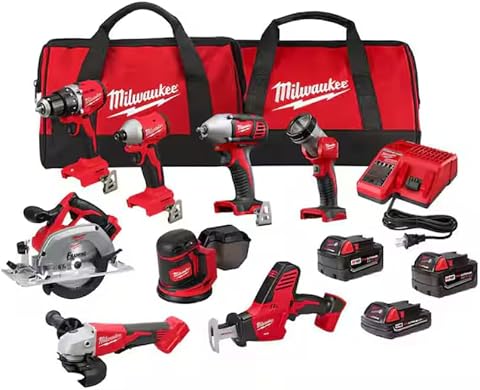
Milwaukee M18 18V Cordless Power Tool Combo Kit
- ✔ Weight: Varies by tool
- ✔ Battery type: Lithium-ion
- ✔ Warranty: Limited
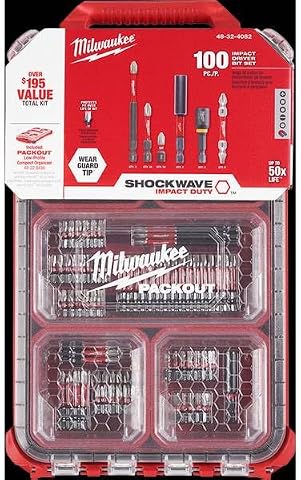
Milwaukee Shockwave 100pcs Impact Driver Bit Set Packout
- ✔ Length range: 1-3 inches
- ✔ Storage weight: Approximately 5 lbs
- ✔ Warranty: Limited
Milwaukee M18 18V Cordless Power Tool Combo Kit
<p>The Milwaukee M18 18V Cordless Power Tool Combo Kit offers a comprehensive set of tools, three batteries, and a rapid charger, making it ideal for construction, remodeling, and maintenance work. Its reliable M18 battery system ensures consistent performance across all tools.</p>
Pros:
- Includes 8 tools for various applications
- Three batteries ensure extended runtime
- Fast charging reduces downtime
- Portable tool bags for organization
Cons:
- Heavy for prolonged use
- Battery replacement can be costly
- No USB charging port
Best for: Professional contractors and serious DIYers
Not ideal for: Light-duty tasks or casual users
Bottom line: A versatile, all-in-one kit perfect for demanding jobsites.
Milwaukee Shockwave 100pcs Impact Driver Bit Set Packout
<p>This Impact Driver Bit Set enhances your Milwaukee tools with a comprehensive 100-piece collection, packed in a durable Packout case. Ideal for professional and DIY projects requiring a variety of bit sizes and types.</p>
Pros:
- Wide variety of bits
- Durable storage case
- High-quality impact rated bits
- Great for extensive projects
Cons:
- Bulkier case for compact storage
- Some bits may be overkill for small jobs
- Requires impact driver compatibility
Best for: Heavy-duty impact driving and fastening
Not ideal for: Basic home repairs or light tasks
Bottom line: A comprehensive set to handle all impact driving needs.
Frequently Asked Questions
How do I know if my Milwaukee battery is completely dead?
If the battery does not show any signs of charging after multiple attempts and the charger’s indicator remains off or shows an error, the battery may be dead or faulty.
Can I use a different charger with my Milwaukee batteries?
It’s recommended to use the charger included with your kit or a compatible Milwaukee rapid charger to ensure proper charging and safety.
What should I do if my battery gets hot while charging?
Remove the battery from the charger immediately, let it cool in a dry, ventilated area, and avoid charging in extreme temperatures to prevent damage.
How often should I replace my Milwaukee batteries?
Battery lifespan varies with use, but signs like reduced runtime, difficulty charging, or physical damage indicate it’s time for replacement.
Keep Your Milwaukee Batteries Charging Smoothly
By following these troubleshooting steps, you can identify and fix most charging issues with your Milwaukee batteries. Regular maintenance and proper storage will prolong your batteries’ life, ensuring your tools stay ready for every job. If problems persist, contacting Milwaukee customer support or replacing the battery may be necessary for continued reliable performance.
Affiliate disclosure: As an Amazon Associate we earn from qualifying purchases. Prices and availability are accurate as of the time of publishing.
Fall Picks
fall essentials
As an affiliate, we earn on qualifying purchases.